Your AI receptionist · 24/7

Every unanswered call could be a lost booking. She answers for you.

An AI receptionist picks up the phone, checks your free tables and saves the booking while you run the restaurant. After hours and on holidays too.

No sign-up · In your browser · 30 seconds
  • Keep your own number
  • Automatic bookings
  • From $199/mo
La Bella Napoli ● Live call · AI
La Bella Napoli, how can I help you?
Hi, I'd like a table for 4 tomorrow at nine
Perfect! Tomorrow at 9:00 PM for 4. What name should I put it under?
Daniel
All booked, Daniel. See you then! Anything else?
Booking saved automatically
Try it yourself: talk to her
The problem

The phone always rings at the worst moment

Mid-order, with a full room, on your day off or once you've cleaned up. And whoever can't get through hardly ever calls back — they call the place next door.

Your usual number

Nothing to set up

It connects to the number you already have. No new line, no sign to change and nobody to tell: it answers when you cannot.

Set up with your house

It talks about your restaurant

Opening hours, closing days, tables and seats, languages and what it may say about you. No textbook answers: yours.

No work for the team

Nobody has to learn anything

No new app, no training. What it does is written down in a panel, and you look at it whenever it suits you.

How it works

One booking, from start to finish

This is what happens every time the phone rings and nobody can pick up. A few seconds, and nobody on your team has to stop what they're doing.

  1. 1

    The call comes in

    To your usual number. If you don't pick up, or the line is busy, call forwarding passes it to the AI.

  2. 2

    It talks with the guest

    It understands what they want however they put it, and only asks for what's missing.

  3. 3

    It checks your real tables

    Opening hours, capacity and free tables. If nothing fits, it offers another time — it never invents a slot.

  4. 4

    Booking saved

    It lands in your dashboard with the name, the time and the transcript. On Pro, the guest also gets a text confirmation.

Make the test call yourself Free, no sign-up, right in your browser.

Your dashboard

Everything it does, at a glance

Bookings, calls and tables, live. Nothing to learn: the AI does the work and here you just look at what it did, whenever it suits you.

01 Home

Today at a glance

You land on today's bookings, the covers coming in, how many tables are taken right now and the minutes left on your plan. Below, today's service hour by hour and the latest calls.

Before you open you already know whether the kitchen needs backup.
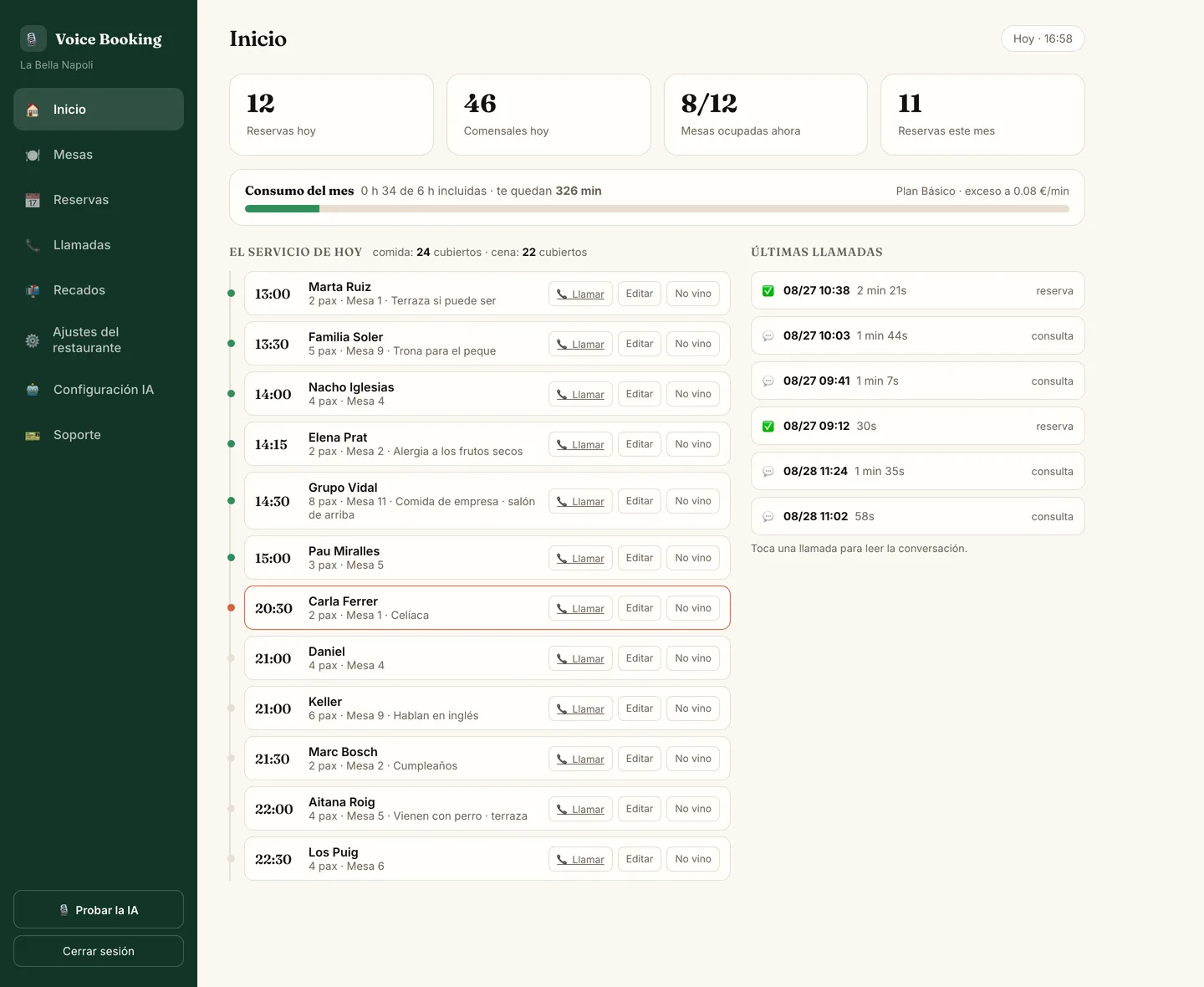
Home screen of the Voice Booking AI panel
02 Bookings

The month at a glance

Every day with its bookings and covers. Search by name or phone, and if someone books in person you add it by hand: name, party, time, date and notes.

The system picks the table — you never have to juggle them.
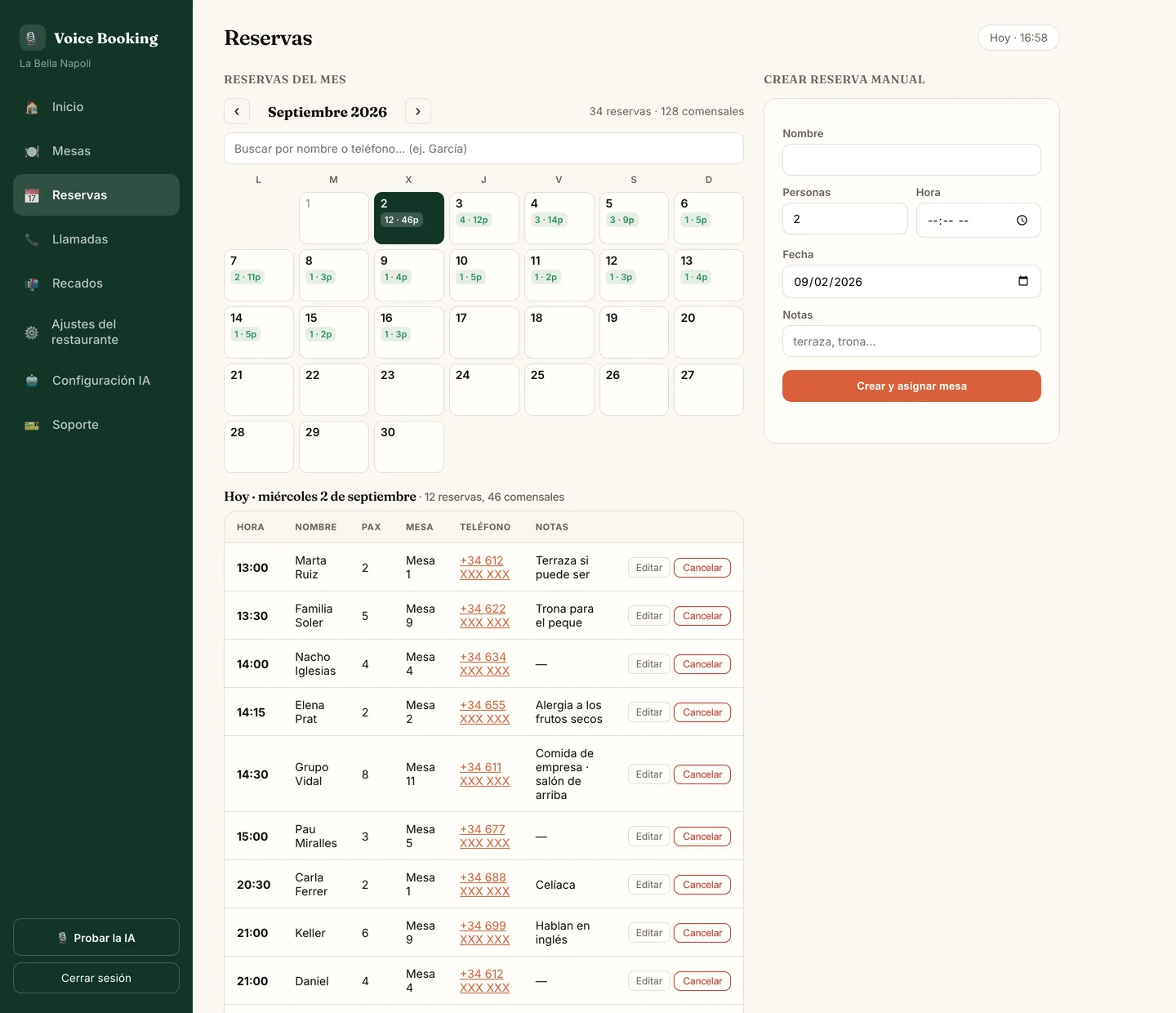
Bookings screen of the Voice Booking AI panel
03 Tables

Your room, table by table

Every table with its capacity and its status: free, taken, booked or out of service. Seat it, clear it or block it in one tap.

The AI checks this before accepting a booking. That's why it won't take what doesn't fit.
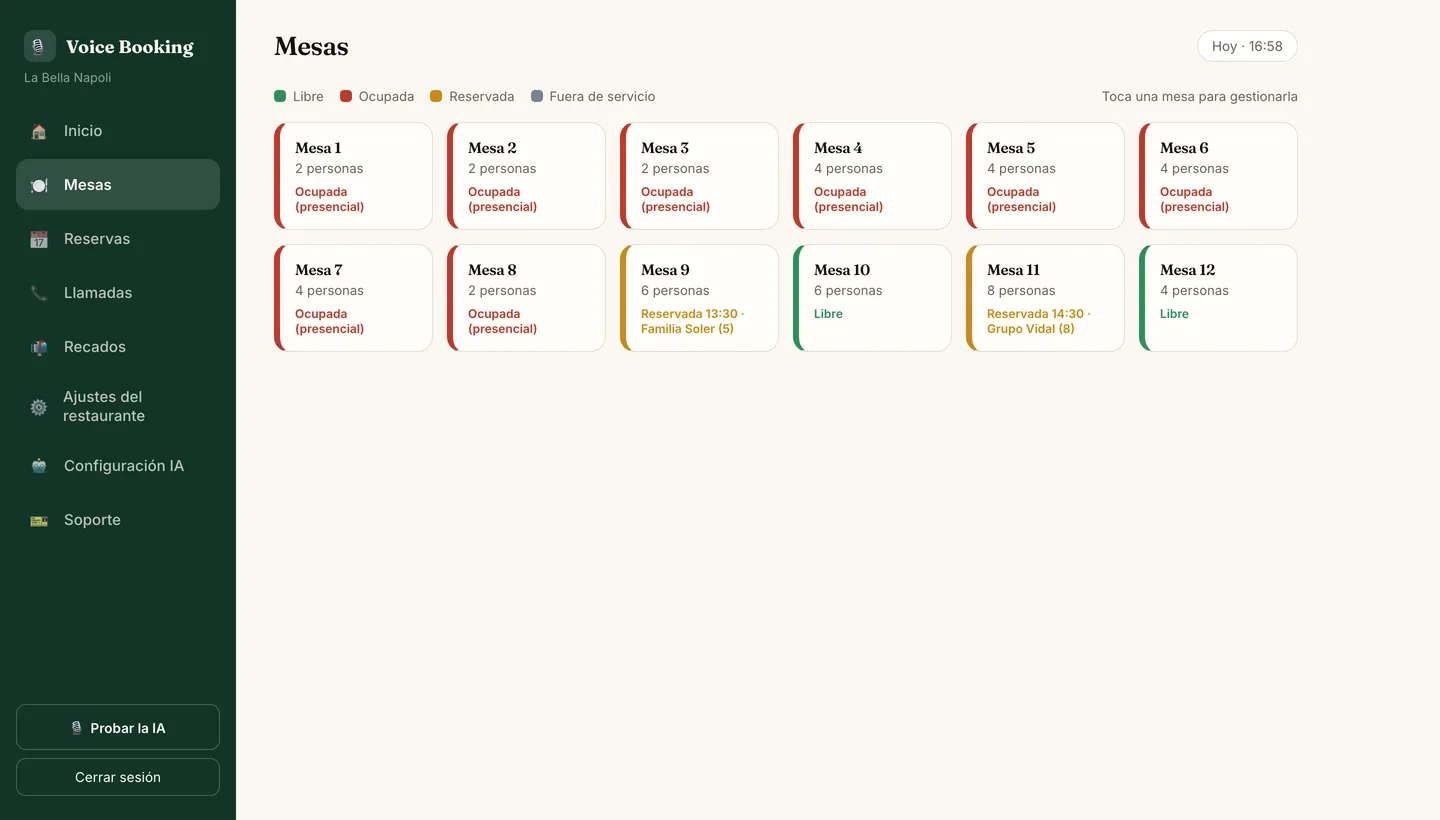
Tables screen of the Voice Booking AI panel
04 Calls

What was said on every call

The full log: date, length, whether it ended in a booking or a question, what that call cost and the whole transcript of the conversation.

If a guest disputes something, it is there word for word.
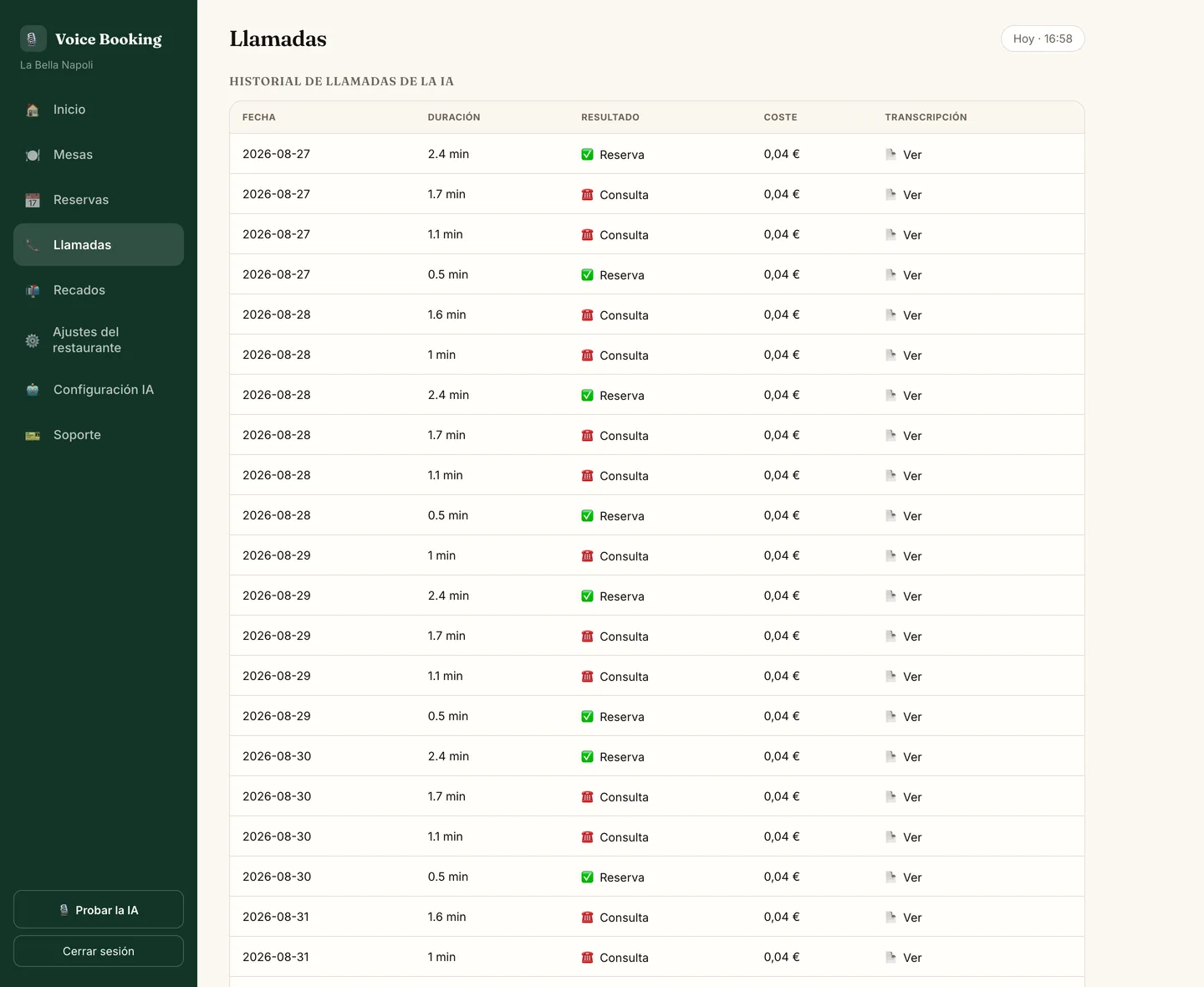
Calls screen of the Voice Booking AI panel
05 Messages

What you need to call back

When someone wants a person — a supplier, the press, a complaint — the AI takes the name, the number and the reason, and leaves it here.

It doesn't invent an answer just to get through the call.
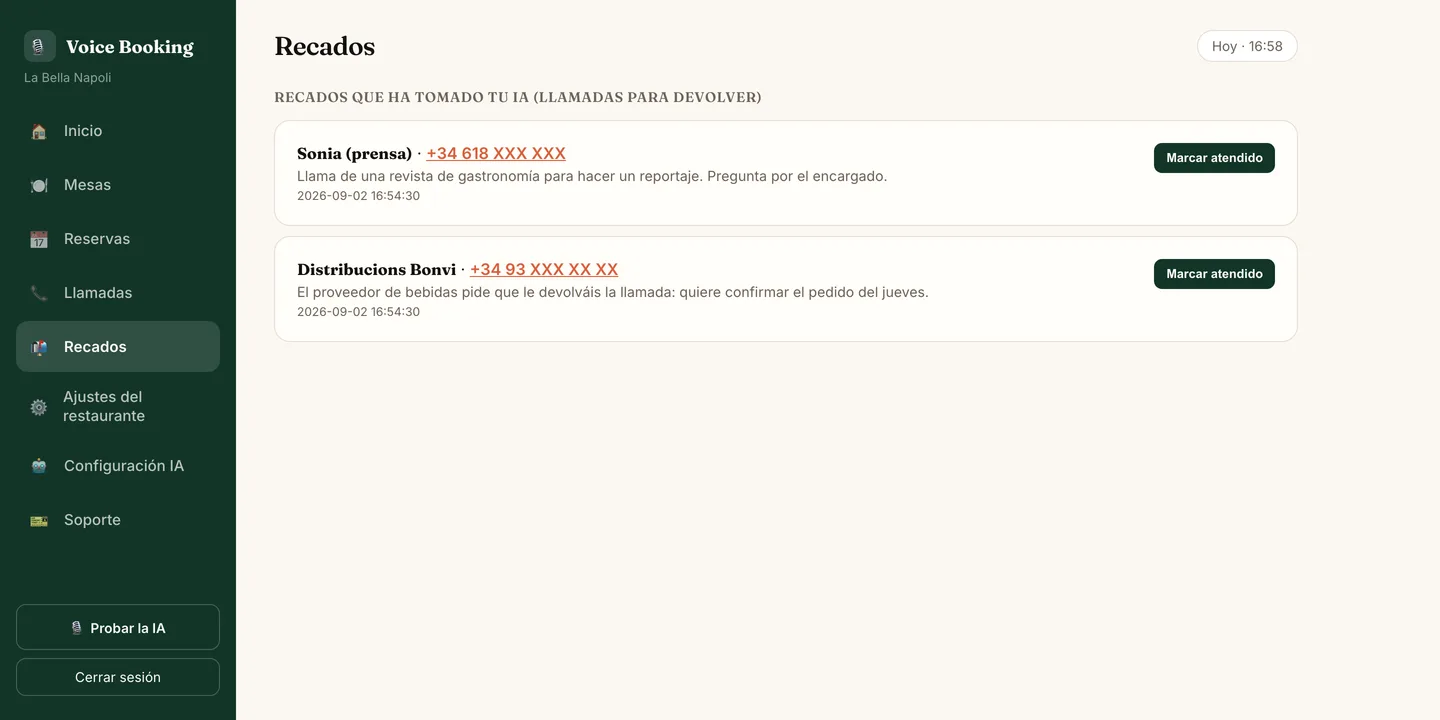
Messages screen of the Voice Booking AI panel
06 Restaurant settings

What the AI knows about you

Opening hours (split shifts too), closing days, holidays, tables and seats, how long a table lasts, and what it may say: terrace, parking, pets, step-free access, kids' menu and your own rules.

Whatever you leave blank it won't make up — it says you'll confirm.
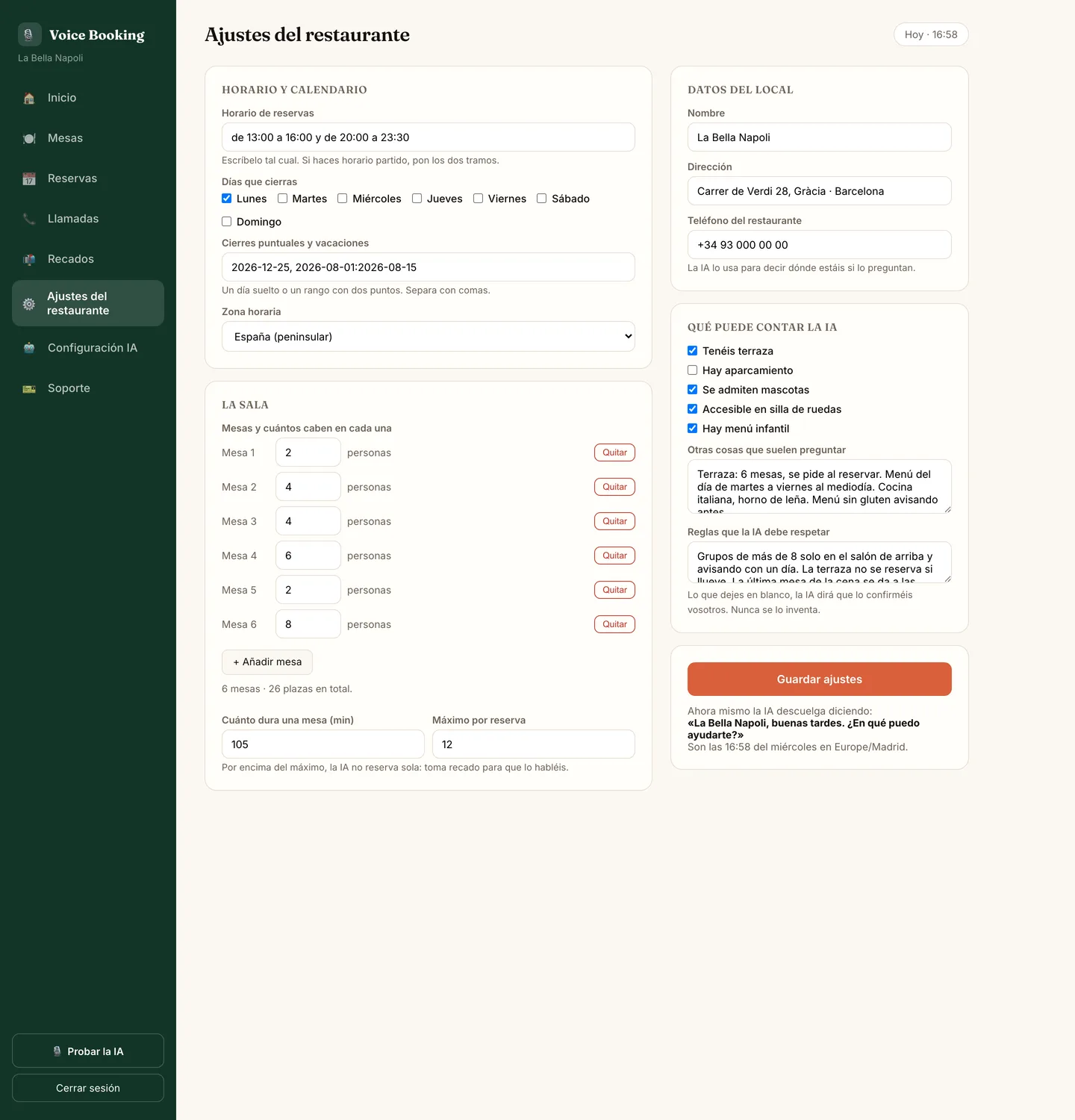
Restaurant settings screen of the Voice Booking AI panel
07 AI settings

How it sounds, and in which languages

You pick the voice and tick the languages it handles: English, Spanish and Italian. This is also where your number is connected and where you cancel, if it ever stops paying for itself.

No lock-in, and nobody to phone to cancel.
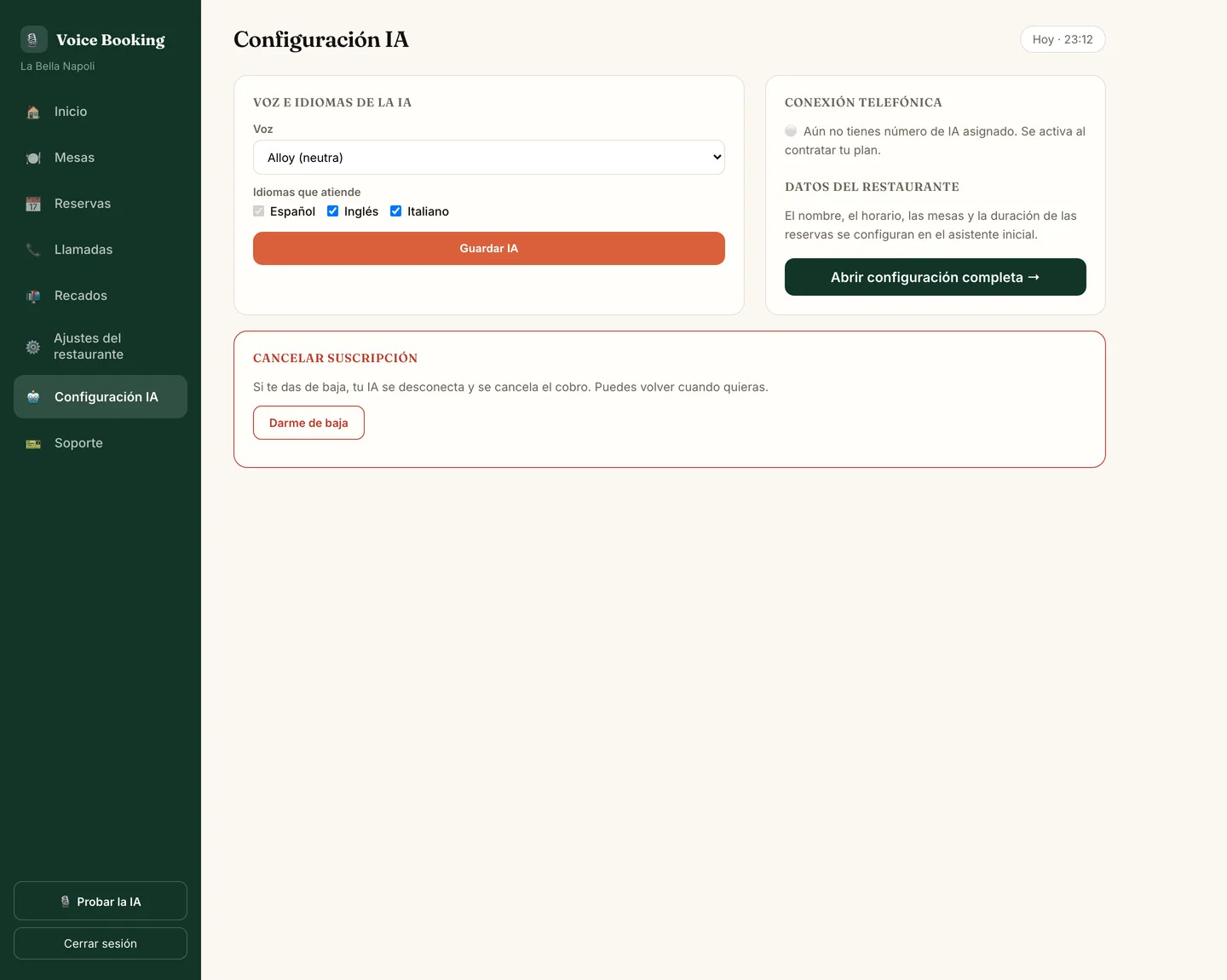
AI settings screen of the Voice Booking AI panel
08 Support

If something isn't right

You open a ticket from the panel itself, with a subject and a message, and we answer right there. No hunting for someone to call, no hold music.

There's a person on the other side, not a form.
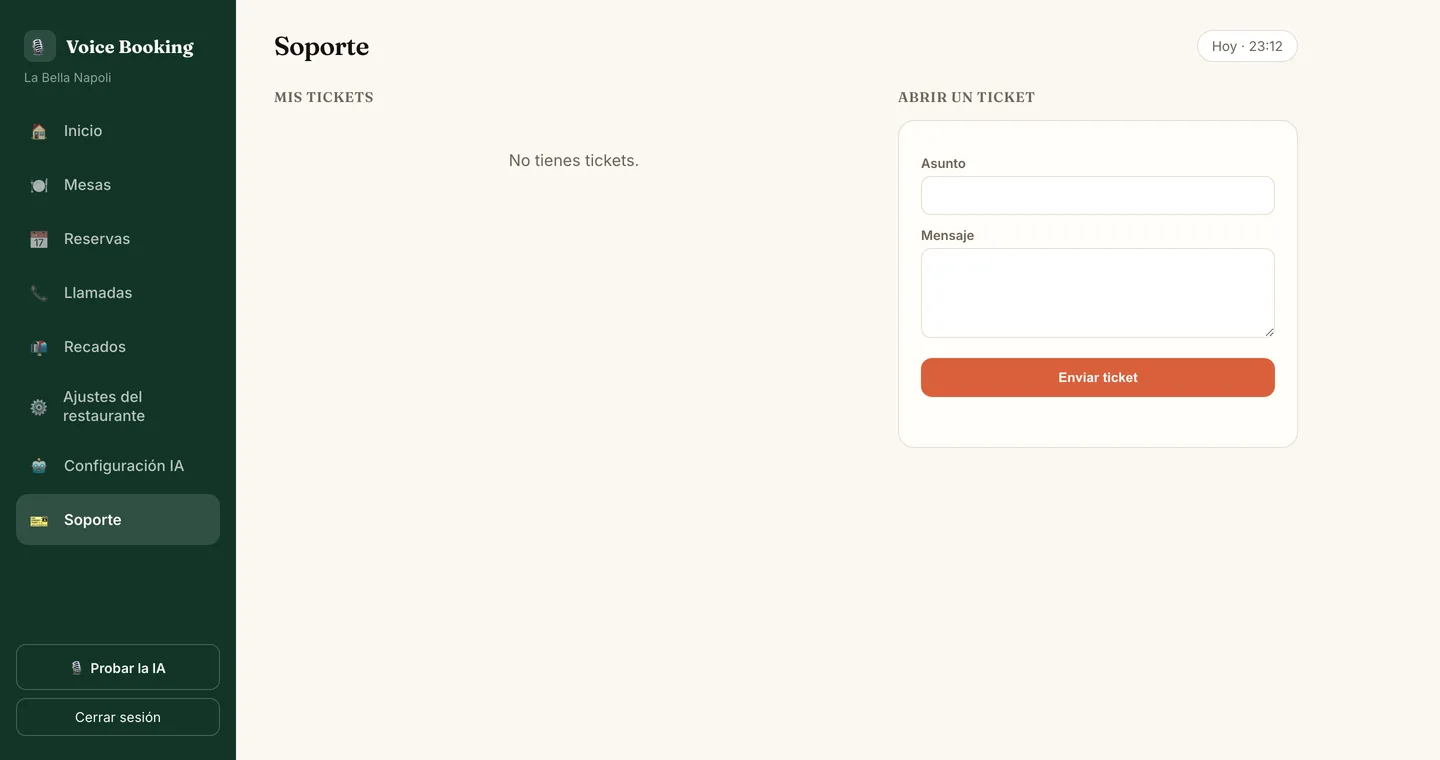
Support screen of the Voice Booking AI panel

And if you'd rather never log in, that's fine too: the AI picks up the phone all the same and you check the panel whenever you feel like it.

Try it

Talk to it like you'd talk to your restaurant

Call it now and see for yourself: ask about the terrace, change the time halfway through the conversation, or crack a joke at it.

Talk to the receptionist

30 seconds, from your browser, nothing to install.

Restaurant dining room with round wooden tables laid out and a leather bench, with nobody free to answer the phone.
A full house is no excuseWhile you work the floor, it answers.
All included

A receptionist that never rests

Answers every call

24/7, holidays and weekends included. Several at once. Never busy.

Books by real tables

Tracks capacity, free and occupied tables in real time. Combines tables for groups.

Cancels & reschedules

Customers cancel or change their booking by phone, without bothering you.

Speaks three languages

English, Spanish and Italian. It switches to whatever the caller speaks — tourists get served in their own language.

Answers questions

Hours, patio, vegan menu, parking, dogs… whatever you set up.

Live dashboard

Every booking and your floor status on one screen, in real time.

Your phone

It connects with call forwarding. It disconnects the same way.

No new phone system, no cables and no switching carriers. Here's what to know before you turn it on:

How it's switched on

We give your receptionist its own number and, from the restaurant's phone, you dial a call-forwarding code. It works with landlines and mobiles on any carrier that allows forwarding — which is almost all of them.

When it answers

Your call: only when you don't pick up or the line is busy —you keep answering the rest— or every call, for example after hours.

If your internet goes down

It doesn't matter. Your phone carrier does the forwarding and the receptionist runs in the cloud: the restaurant's wifi isn't involved.

If it can't sort something out

It doesn't make things up: it takes a note and leaves you a message in the dashboard so you can call back. Every call is saved with its transcript.

How it's switched off

Dial the code to cancel forwarding from the same phone. A second later everything rings at the restaurant again, just like before.

If you already use booking software

Today the receptionist books in its own dashboard, with your tables and your hours. With OpenTable, Resy, CoverManager, TheFork and others there is no automatic connection: on Premium we look at a custom integration, case by case. We tell you before we charge you anything.

Pricing

It pays for itself with one booking

No contracts, no setup fee, cancel anytime. Setup, configuration and support are included in every plan.

Basic

For bars and small spots.
$199 /mo
6 hours of answered calls ≈ 120 calls a month* · beyond that, $0.09 per minute
  • Answers 24/7, holidays & weekends
  • Creates, cancels & edits bookings
  • Answers questions (hours, patio…)
  • Live booking dashboard
  • English only
  • Setup & configuration included
MOST POPULAR

Pro

For the average busy restaurant.
$289 /mo
20 hours of answered calls ≈ 400 calls a month* · beyond that, $0.09 per minute
  • Everything in Basic
  • English, Spanish & Italian
  • Real-time table & capacity management
  • Combines tables for large groups
  • Text confirmation to the customer
  • Priority support · no contract

Premium

For large venues & tourist areas.
$389 /mo
40 hours of answered calls ≈ 800 calls a month* · beyond that, $0.09 per minute
  • Everything in Pro
  • All three languages, always on (EN + ES + IT)
  • Custom brand voice
  • Custom integrations (POS, calendar…)
  • Dedicated account manager
  • Setup & configuration included

* Assuming an average of 3 minutes per call; a simple booking is usually shorter. What counts is talk time, not the number of calls: an extra hour is $5.40.
Every plan includes setup, configuration and support, billed month to month with no contract. Tax not included.

Set up in one minute

Put your receptionist to work

Your name, email and phone are all it takes to get started. No contract, no setup fee, no sales calls.

Optional: tell us how your restaurant runs and we'll show you the right plan straight away

A rough idea is fine. Leave it blank and we'll ask you ourselves.

We only use your details for this — never sold, never added to a list.

Questions

Frequently asked questions

Do I have to change my phone number?

No. It connects through call forwarding from your current number: your customers keep calling the same line and the AI answers when you can't. To switch it off, you dial the code to cancel forwarding and everything rings at the restaurant again.

What happens if the restaurant's internet goes down?

Nothing. Your phone carrier does the forwarding and the receptionist runs in the cloud, so the restaurant's wifi isn't involved.

Does it work with OpenTable, Resy, CoverManager, TheFork or other booking software?

There is no automatic connection to other software today: the receptionist books in its own dashboard, with your tables and your hours. On the Premium plan we look at custom integrations, case by case, and tell you whether it's feasible before we charge you anything.

Does it sound robotic?

No. It speaks with a natural voice, with intonation, and converses like a real receptionist. Most customers don't notice it's an AI.

What if the AI doesn't know something?

It answers whatever you configure (hours, patio, menus…). If something slips through, it takes a note so you can call back.

How long does it take to set up?

24 hours. You give us your restaurant and table details, and we get it ready.

Is there a contract?

None. It's monthly and you cancel whenever you want.

Does it work on weekends and holidays?

Yes, 24/7. Exactly when the most calls come in and they're hardest to answer.

How much does an AI receptionist for a restaurant cost?

From $199 a month, with no setup fee and no contract. The plans differ in the hours of calls answered and in the languages.

How is it different from an answering machine?

An answering machine records a message, and a “press 1” menu walks the caller through options. This receptionist has a conversation: it understands what they are asking for, checks your tables and closes the booking on the same call.

Can it take several calls at once?

Yes. It answers several calls at the same time and the line is never busy, mid-service and after hours too.

What languages does it answer the phone in?

The Basic plan answers in English. With Pro and Premium it speaks English, Spanish and Italian, and switches to whatever the caller speaks, so tourists are served in their own language.

How does it know which tables are free?

It looks at your dining room in real time: every table’s capacity and whether it is taken, booked or out of service. If nothing fits at that time, it offers another one instead of inventing a slot you don’t have.

What happens if I go over the hours in my plan?

The extra minutes are billed at $0.09 a minute, at cost. No need to jump up a plan halfway through the month.

Can I see what was said on a call?

Yes. Every call is logged in the panel with its date, its length, whether it ended in a booking or a question, and the whole transcript of the conversation.

Is it any use for a small bar?

Yes. The Basic plan is meant for bars and small places. If your call volume grows you can move up whenever you like: there is no contract.

Stop losing bookings

Talk to our AI receptionist live right now, or create your account and we'll set it up within 24 hours — no technical work on your end.